A dive log made by divers, for divers who travel

Every dive, kept — even with no signal at all.

Photo-first. Trip-first. ScubaFlow Dive Log saves every keystroke on your phone, so you can log on the boat, at a remote resort, in airplane mode — no internet needed, ever.

Open Dive Log
In private beta — how to get in
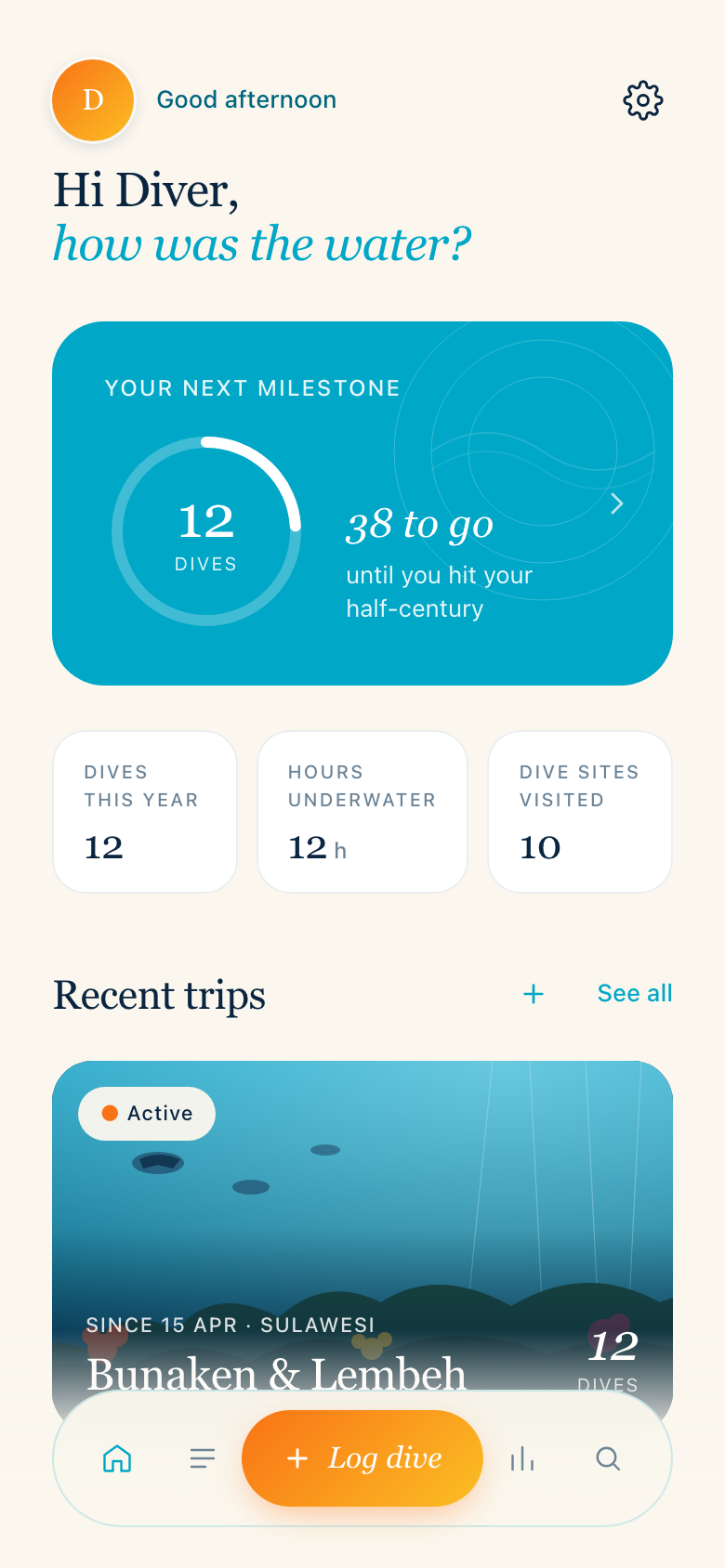
ScubaFlow Dive Log home screen — milestone progress, dive stats and recent trips
Saved offline ✓
The part we're proudest of

No signal? No problem.

Most dive log apps quietly assume you have wifi. Divers don't. Everything in ScubaFlow Dive Log works completely offline — logging, photos, voice notes, search, stats. Your logbook lives on your phone, not on someone's server.

On the boat

Log the dive during your surface interval, while the details are still fresh. Nothing to sync, nothing to wait for.

At the resort

Remote-island wifi that drops every five minutes? Doesn't matter. The app never needs it.

In airplane mode

Fill in your logbook on the flight home, photos and all. It's all saved the moment you type it.

What's inside

A logbook that's a pleasure to use

Built around how travelling divers actually dive — in trips, with cameras, far from reliable wifi.

Photos as heroes

Your shots front and centre — trip covers, dive galleries, dive maps, topside moments. Auto-compressed so they never eat your storage.

Trips, not just dives

Your logbook organises itself the way you remember it — by trip. Lembeh last spring, the Red Sea before that.

Voice notes

Some dives need more than typed words. Record the story on the surface and keep it attached to the dive.

Milestones

Dive 100 is coming. The app counts down with you — and you can set your starting dive number in Settings, so every dive in your old logbook counts.

Find any dive

Search and filter across everything — sites, buddies, tags, countries, depths. That one dive from 2021? Three taps away.

Your data is yours

One-tap export of your entire logbook — CSV, UDDF, JSON and every photo, in a single zip. No lock-in, ever.

Where it's going

The roadmap — you're steering it

This is a beta, and the order below isn't fixed — what testers ask for moves to the front of the queue. Here's what's on the drawing board:

Up next

Cloud backup & sync

Your logbook safely backed up and on every device you own. Offline-first stays — sync happens quietly in the background when you have signal.

App Store & Google Play

Proper native apps alongside the web version, with everything that comes with them.

Desktop photo import

Shot on a real camera? Pull photos in from your computer straight to the right trip — no emailing yourself files.

Social share

Share a dive as a beautiful card — photo, site, depth — straight to Facebook, Instagram or wherever your buddies are.

On the horizon

Marine life log

A life list of every species you've seen, built up dive by dive.

Voice note transcription

Your recorded notes turned into searchable text — opt-in, per recording.

Dive centre sign-off

Verified dives, digitally stamped by the centre you dived with.

Buddy linking

Connect logs with the people you dived with — shared dives, shared photos.

Dive centre contact buttons

Tap to WhatsApp, Instagram or email the centre you dived with — straight from the dive.
And what we'll never build Dive-profile spreadsheets, deco simulators, forty-field entry forms, or an in-app social network. Your logbook keeps the memories — sharing them happens on the apps you already use.
Private beta

Getting in is easy

We're testing with a small group of divers first. There are two ways in:

You got an email from us Your personal link opens the app and signs you in automatically — no password, nothing to set up. Links are valid for 24 hours; if yours has expired, just enter your email in the app and we'll send you a fresh one.
You have an invite code Open the app, enter your code, and you're in. Codes are one-time use and some carry an expiry date — redeem yours soon after you get it.

Open your link (or enter your code)

Tap the personal link in your invite email, or head to divelog.scubaflow.io and enter your invite code. Use the phone you'll log dives with.

Add it to your home screen

So it sits next to your other apps and opens full-screen. The app shows you exactly how the moment you're in — it's one tap.

On iPhone: tap the share button, scroll down, tap "Add to Home Screen."
On Android: tap the ⋮ menu in Chrome, then "Add to Home screen."

Log a dive or two

Real or from memory — have a play. Everything works offline from the moment you're in.

Tell us what you think

There's a feedback button right inside the app — it messages us directly on WhatsApp. The good and the bad, send it all.